|
|
 |
Custom Embroidered Logos &
Designs
begin with High-Quality Digitizing |
| Digitizing is
the most important part for creating high quality Custom Embroidery. Embroidery
digitizing or coding, originally referred to as "punching", is the
art of creating embroidery "stitches" from text or printed graphic
art. Digitizing creates instructions allowing a logo to be stitched on a
commercial embroidery machine. |
| We utilize
state-of-the-art digitizing software using advanced vector art graphics
allowing for fast, affordable and precision conversion of high end business
logos, artwork and text into superior custom embroidery. If you already have a
Digitized file, we accept Tajima DST file formats. |
We do our
own Digitizing IN-HOUSE! High-Quality, Affordable and FAST!
Digitizing is a one time
expense. Once your Logo, Artwork or Design is digitized
you can re-order as many times as you wish with no additional costs.
There
are no digitizing costs for setting up simple text, monograms or names using
standard fonts. |
| Free Digitizing on
ANY APPAREL ORDER over $150! |
  LOGO AND THREAD COLORS:
Embroidery
thread colors may vary from the actual colors in your logo. Pantone PMS and RGB
color matching are NOT used for embroidery colors. Our Digitizing software
analyzes the colors in your logo and recommends a thread color which appears to
be a close match. LOGO AND THREAD COLORS:
Embroidery
thread colors may vary from the actual colors in your logo. Pantone PMS and RGB
color matching are NOT used for embroidery colors. Our Digitizing software
analyzes the colors in your logo and recommends a thread color which appears to
be a close match.
click here to select THREAD COLORS
Please
provide us with the proper thread color number. Also keep in mind that colors
on your personal computer monitor may vary slightly from the actual thread
color based on your computer monitor settings.
|
| LOGO SIZES: Logos placed
on shirts or jackets in a left chest position should not exceed 3.75" x
3.75" in size. Most Logos are usually sized to fit within 3 to 3 1/2"
wide. Logos are placed above pockets not on them. Embroidery on the back of
jackets or hoodies typically is sized to fit within 12" x 12", but
larger areas are possible. |
| LOGO EMBROIDERY ON HATS &
VISORS: Hats have a
limited surface area to embroider on depending on the style of the hat,
basically 1.75" up to 3" high. Low profile
or unstructured hats should be limited to embroidery 2" high,
while structured higher profile hats can accomodate embroidery up to 3"
high. |
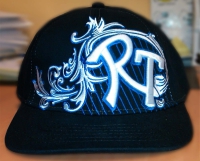
| The majority
of logos for Mid or High Profile hats is 2.5" high, there are substantial
limitations on using designs up to 3 inches high. Even if the hat is a high
profile, that does not mean that it can accept every 3 inch design. Many
problems occur with large 3 inch designs including, shape distortions at the
top due to the change in curvature on the hat, inadequate manuvering room for
the embroidery machine to move and operate properly. The majority of embroidery
on hats is 4" to 5" wide, but we have the ability to embroider up to
270 degrees around a hat for side facing logos. |
 |
Many customers
get confused when they see Urban style hat designs being sold with crazy
embroidery all over the hat, including embroidery on the bill, then following
up onto the hat; or designs seemingly going from the very bottom edge up and
over the top crown, or even embroidery over straps or along the edge line of
the bill. |
| ALL of these
are referred to as "Manufactured Hats", in other words, the hats are
made that way. These styles are done overseas in China on flat fabric, so
basically anything can be stitched anywhere. Then the fabric is cut and sewn
into the hat. It is impossible to offer that type of embroidery and styling on
existing hats. |
| Do
we offer manufactured style hats? Absolutely! You can do almost anything you
want since the entire hat is made to order, any color, any style, the list of
features is enormous, BUT the MINIMUM quantity for ANY order is a gross or 144
pieces and the lead time is 90 Days, AFTER all approvals! If you have any
questions, or need a price quote just call or email us. |
| Visors have
minimal area to work with. The maximum vertical area for embroidery on a Visor
is usually 3/4" to 1" high. Basically, Visors should be used for text
or very small simple logo images only. |
 |
3-D or PUFF EMBROIDERY:
Yes, we offer
3-D or Puff Embroidery. Its a simple technique of incorporating a unique
embroidery foam into your design which makes the design dramatically stand-up
or PUFF. Can any design be made into puff? No! Puff needs width, but not too
much width. Typically, the preferred width is 1/4 to 1/2" wide, designs
which are too large or too wide cannot be converted into puff, same applies to
objects or lettering which are too small or thin. The only way for us to give
you a complete answer is if you email you design to us and explain what you
want to do. |
| Custom Made to Order:
Logos and
designs cannot be embroidered onto the Bill of a hat, Hat straps, All-Over a
hat or along the edge of a bill. These are all techniques which are done in
mass production overseas before the hat is a hat. Its referred to as flat
goods. All the embroidery and decoration is done on flat fabric which is then
cut and sewn into the hat. YES, we do offer the capability to have hats made
this way for you, however, the minimum order quantity is 144 pieces and the
lead time after all approvals is 3 to 5 months. |
| LOGO NO-NO'S: Embroidery is
NOT printing, if your logo or artwork includes drop shadows, color gradients or
shading, we will have to discuss how to make the color scheme conform to
embroidery. Color gradients or shading are not practical in embroidery. We have
some tricks, but there are limits on what can be achieved with needle and
thread. |
 |
| We cannot
duplicate color gradients within small individual letters, numbers or other
small objects, gradient effects can be reproducted only within larger objects
or shapes. Certain color gradients can be dealt with. This is done using thread
layering and over stitching.. Although this achieves a gradient type effect, it
also adds considerable stitching to any logo. Our fish example shown below
demonstrates this technique. Notice that there are several areas where colors
are layered over colors at the tail and gills. |
 |
 |
The use of
gradients may increase the overall embroidery cost by as much as 30% to 60% or
more depending on the number of layered colors and overall size of the logo or
design. Because layering adds substantially more stitches, the added quantity
of stitches does not work on all types of fabrics such as lightweight, thin or
stretchy knits. |
| Typically, we
can do a 2 or even 3 color gradient effect. But, when gradients have many more
colors, then trying to reproduce that with embroidery is not considered the
best approach unless the embroidered image is very large, i.e. a full size
jacket back. |
| LOGO TEXT AND LETTERING:
Letters which
are too small or certain font styles do not embroider well. Consider the
difference in height between Capital Letters and Lower Case Letters. Fonts with
serifs, i.e. little points or thin lines at the ends of the letters, look great
on letterhead, business cards and anything that is printed, BUT those fonts do
not embroider well especially when they are small. It is very difficult for
needle and thread to recreate those. Avoid small lettering using fonts with
serifs such as: TIMES ROMAN, BODONI, BOOK ANTIQUA or COOPERPLATE. |
| Avoid
excessive outlining of letters, especially on small letters. Thin lettering
including narrow fonts like Times Roman, brush scripts, handwriting styles just
to name a few, should not have outlines, unless the letters are at least
1/2" high. |
TEXT letter sizes must be at
least 1/4" high or
a FONT SIZE of 24 as a MINIMUM at the final embroidered size. |
| DO YOU HAVE MICROSOFT WORD?
Select any
font style you like from Microsoft Word, we've got them all and more! When you
select text, please let us know the font style, the color, the size and format
of capitalization. Not all font styles can be embroidered, please select solid
letter style fonts and avoid fonts with graphic embellishments, built-in
outlines, intense internal details or objects. |
| Make your logo really cool with
FREE fonts from: www.dafont.com |
| There are
corporate logos and designs which use one-of-a-kind custom or unique fonts
which we may not have. When sending a Vector Art File
(Ai, EPS, PS, PDF, CDR or CMX), convert the TEXT TO CURVES, PATHS or OUTLINES
to reduce the possibility of font conflicts. or send us your custom
TTF font file IF you want us to EDIT your text or if you want us to ADD
matching text, without your unique font file, we cannot recreate the text
properly. |
| If you are
working in Corel, click on the text to be converted, select ARRANGE; then
select CONVERT TO CURVES. The text will become a design object and is no longer
text. |
| If you are
working in Adobe Illustrator, to convert text to outlines, select SELECT/SELECT
ALL. It doesn't matter if other graphic elements are selected. then select
TYPE/CREATE OUTLINES. The text will become outlined and can't be edited as
text. |
| Fonts are
found in the folder WINDOWS; subfolder FONTS, simply attach the font to your
e-mail for download. If you have trouble attaching a font directly from the
font folder, you can create a copy of the font by opening your font file folder
in a small window and then drag that font to your desktop where you can then
attach it to an email. We can only use font files with a file extension of TTF
or OTF. If your font is MAC based, find your FontBook and send us the DFONT
file. |
| What format is YOUR
LOGO? VECTOR ART or BITMAP (RASTER): |
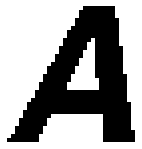 |
Bitmaps are images made up of
little squares. Imagine
creating your logo using graph paper. There are no lines, no arcs, no shapes,
just lots and lots of little squares. So all outlines and edges are ragged and
jagged, not smooth. Bitmap files include BMP, GIF, JPEG, TIFF and many more.
All paintshop programs and digital cameras use bitmaps only. |
 |
| Bitmaps cannot
be scaled very well. Its difficult to take a bitmap image which looks great
when its the size of a postage stamp and make it the size of a wall poster. If
you send us a bitmap file, make sure it is sent as large as possible. We need a
resolution of least 300 dpi or higher. Copying images from the internet will
result in low resolution 72 DPI images. |
 |
Vector Art is an image made up
of points and lines. It is a
mathematical formula which defines the shape. Each line has a start, a finish,
a length and a direction. No matter what, math controls the shape, so circles
are really circles, and lines are perfectly straight. Re-sizing an image or
logo is a snap with vector art because the mathematical formula is built-in and
is always working to control proportions, so no matter how small or how large
you want your logo to be, it will always be exactly the same. |
 |
| Vector art
works best for embroidery. Almost all corporate logos developed by professional
graphic design firms are in Vector Art formats. Vectors are the standard in
graphic design, printing and publishing. Vector file formats include: Ai, EPS,
CDR and some PDF, there are many others, but those are the most popular
formats. |
| FABRIC GUIDELINES FOR
EMBROIDERY: |
| Embroidery is
NOT a one to one replacement for printing, patches or heat transfer vinyl
lettering. Although embroidery is done with needle and thread, there is a limit
to the amount of stitching any fabric can hold. Logos, Text or Artwork in
excess of 10,000 stitches may cause slight pulling on the surrounding fabric,
especially on very lightweight, stretchy, loose or open weave fabrics such as
most T-Shirts, Lycra, Spandex, polyester knits/blends, polyester mesh, terry
cloth or rayon fabrics. |
| Embroidery
thread is heavier, stronger and a tighter density than the surrounding fabric.
If your project requires large, dense embroidery over 10,000 stitches, please
select heavyweight fabrics with an ounce weight higher than 7 ounces OR
high-quality fabrics with tight weaves including denim, double pique, oxford
cloth, cotton canvas, poplin, twill, wool, flannel, fleece or microfiber. Avoid
the least expensive shirts you can find for large stitch count embroidery,
there is a reason why low-priced shirts are low-priced. The quality of the knit
is barely able to hold the shirt together, let alone alot of stitching.
Selecting a shirt which costs less than the embroidery makes little sense. Many
inexpensive polo shirts use the term "Jersey Knit" which is nothing
more than a T-Shirt with a collar. Jersey Knits are not suitable for large
embroidered logos of any kind. |
| Embroidery
will always look best on strong, closely knit fabrics. Open knits or loose
knits such as "jersey knits", lightweight piques, waffle knits, rib
knits or similar fabrics which are uneven may cause very thin or very small
lines or letters to sink down into the fabric or get lost in the weave because
there is not as much fabric to hold the close stitching together. |
|
|